- Visit the CMS Helpdesk Web site.
- Click the Submit a Ticket button.
- Choose the required ticket type from the list presented.
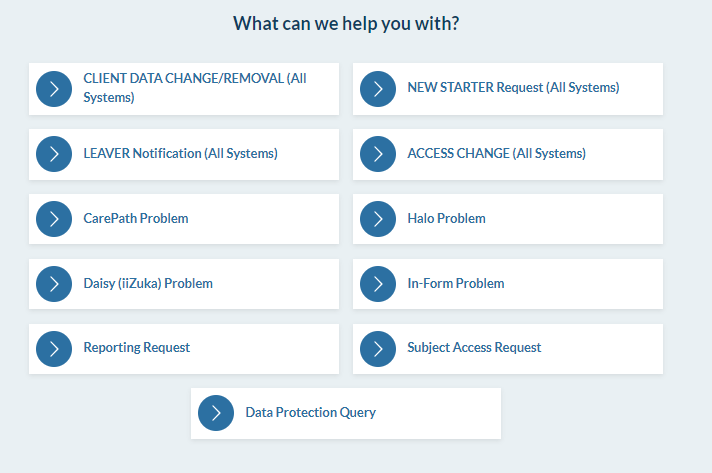
- Each ticket type contains a unique form that collects the required information, so you must select the correct category for your ticket.
- Client Data Change/Removal—This must be used for any request to change or remove client data.
- New Starter Request—This is used for any new staff who require an account. A manager or team leader should complete this request.
- Leaver Notification—To advise of any staff leaving the organisation, these can be completed ahead of time and held until required.
- Access Change - this requests a change in any staff member's access to any of the CMS.
- CarePath, Halo, Daisy, or In-Form problems—These tickets are for system issues that do not require changing or removing client data.
- Reporting Request - If you require a specific report to be created for your CMS.
- Subject Access Request - for any SAR request from any client.
- Data Protection Query - For any queries you require an answer to, excluding SARs.
- You will then be presented with a form to complete. Please complete all the details required.
Important: The NAME and EMAIL fields at the top of the form should always be YOUR name and email, even when raising a ticket to change someone else's account, as this shows who raised the request. - Click the Submit Ticket button to log the ticket on the helpdesk. You will receive an email confirming this and providing a unique reference code for your ticket.
- It is possible that the email went to your Spam or junk mailbox. This article explains how to resolve this.